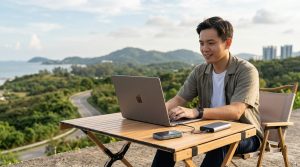
You land in a new city, grab your bag from the overhead bin, and walk straight to a coworking space or cafe. No waiting for checked luggage. No back pain from hauling a heavy roller. That is the reality of a well-planned portable office setup for digital nomads. The goal is simple: fit everything you need to run your business into a single carry-on bag. No compromises on productivity. No sacrificing your health. Just a smart, compact workstation that travels with you.
A carry-on portable office is not about buying the smallest gadgets. It is about choosing versatile tools that work together. Prioritize a lightweight laptop, a folding keyboard, a compact mouse, a portable monitor, and a travel router. Add a standing desk converter and an ergonomic travel pillow. Pack everything in a structured backpack with dedicated compartments. Test your setup at home before your first trip.
The Core Gear You Actually Need
Let us start with the non-negotiable items. These are the building blocks of your mobile workstation.
Your laptop is the anchor. Choose a model that is powerful enough for your work but light enough to carry all day. Think 13 to 14 inch screens. MacBook Air, Dell XPS 13, or a Lenovo ThinkPad X1 Carbon are popular choices. If you need more processing power, look at the Asus Zephyrus G14 or a Microsoft Surface Pro. Keep the charger small. GaN chargers are smaller and lighter than traditional bricks.
A portable monitor changes everything. A single laptop screen can feel cramped after a few hours. A second monitor, even a small one, boosts your efficiency. Look for a 15.6 inch USB-C monitor that is under a pound. Models from Asus, Acer, and Lepow are reliable. Some are even powered directly by your laptop, so you skip the extra cable.
Input devices matter more than you think. Laptop keyboards are fine for short bursts. For a full workday, you want a separate keyboard and mouse. Choose a folding Bluetooth keyboard. Logitech makes the K380, which is compact and connects to three devices. For a mouse, the Logitech M720 or the MX Master 3S are great. They work on any surface, even glass tables.
Audio and video for calls. If you take client calls, your laptop microphone will not cut it. A small USB-C microphone like the Fifine K669 or a quality headset like the Sony WH-1000XM5 makes you sound professional. For video, a Logitech Brio or a Razer Kiyo X gives you better quality than your built-in webcam.
Cable management is not optional. Tangled cables waste time and create stress. Use a small tech organizer pouch. The Peak Design Tech Pouch or the Bellroy Desk Caddy work well. Keep only the cables you need. A single USB-C cable that handles power, data, and video is ideal.
Building Your Portable Office Step by Step
Follow this numbered process to assemble your carry-on workstation.
-
Choose your bag wisely. A standard carry-on suitcase is not the best option. You need a backpack with a dedicated laptop compartment, good padding, and organization pockets. The Osprey Farpoint 40, the Nomatic Travel Pack, or the Aer Travel Pack 2 are excellent. They fit under most airline seats and distribute weight evenly.
-
Select your primary devices. Pick your laptop, portable monitor, keyboard, mouse, and headphones. Test each item for weight. If a device feels heavy in your hand, it will feel heavier after a day of walking. Aim for a total device weight under 8 pounds.
-
Add ergonomic accessories. Your body will thank you. A small standing desk converter that folds flat is a game changer. The Roost Laptop Stand is a popular choice. It lifts your screen to eye level. Pair it with a compact Bluetooth keyboard and a portable mouse. Add a travel-sized lumbar support cushion for chairs that lack back support.
-
Pack for connectivity. Public WiFi is not always reliable. A travel router with VPN support, like the GL.iNet GL-MT300N, gives you a secure network. A portable power bank that can charge your laptop is also essential. Look for a 20,000 mAh power bank with USB-C Power Delivery. The Anker PowerCore 26800 is a solid option.
-
Organize and test. Place everything in your bag. Zip it up. Lift it. Walk around your home for ten minutes. Does it feel balanced? Can you access your passport or phone without unpacking everything? Adjust until the bag feels natural. Then work from your setup for a full day at a local cafe or coworking space. Find the weak points before you travel.
Ergonomics on the Go
Your body does not know you are in a different country. It still needs proper alignment to avoid pain. Here is a table that compares common ergonomic mistakes with better solutions.
| Mistake | Why It Hurts | Better Approach |
|---|---|---|
| Using the laptop screen at table height | Strains your neck and upper back | Use a laptop stand to raise the screen to eye level |
| Typing on the laptop keyboard for hours | Wrists bend at an awkward angle | Use a separate Bluetooth keyboard to keep wrists straight |
| Sitting in a low cafe chair for long periods | Lacks lumbar support, causes lower back pain | Add a portable lumbar cushion or sit on a folded jacket |
| Staring at a small screen without breaks | Eye strain and headaches | Use a portable monitor at a comfortable distance and follow the 20-20-20 rule |
| Keeping your bag on one shoulder | Imbalances your spine and causes shoulder pain | Use a well-fitted backpack with a hip strap |
Expert advice: “Your portable office should be designed around your body, not your bag. Spend the money on a good laptop stand and an external keyboard before you upgrade your laptop. Your neck and wrists will last longer than any gadget.” – Dr. Sarah Lin, ergonomics specialist and remote worker.
Where to Work: Coworking Spaces vs. Cafes
Your portable office works anywhere, but not every location supports deep focus. Here is a breakdown.
-
Coworking spaces offer reliable WiFi, power outlets, and ergonomic chairs. You can spread out your gear without judgment. Many have meeting rooms for calls. The community aspect also helps fight loneliness. If you are in Singapore, check out our guide on how to choose your first coworking space for practical tips.
-
Cafes are cheaper and more abundant. But they come with risks. Loud music, limited outlets, and small tables can make your setup feel cramped. Use cafes for light work or between meetings. Save your deep work sessions for a proper desk.
-
Libraries and hotel lobbies are underrated. Many hotels have business centers or quiet corners. Libraries usually have strong WiFi and enforced quiet zones. Call ahead to confirm their policy on remote workers.
Common Mistakes Digital Nomads Make
Even experienced travelers fall into these traps. Avoid them to keep your portable office running smoothly.
-
Overpacking “just in case” items. You do not need three different charging cables. You do not need a full-size keyboard. Stick to the essentials. If you realize you need something, you can buy it at your destination.
-
Ignoring local power standards. A US plug does not work in Singapore without an adapter. Pack a universal travel adapter with multiple USB ports. The one from Saramonic or the World Travel Adapter Kit from OtterBox are reliable.
-
Forgetting about backup. Your laptop can fail. Your monitor can break. Have a backup plan. Keep a second device, even a tablet, that can handle basic tasks. Store critical files in the cloud and on a local encrypted drive.
-
Neglecting your digital security. Public WiFi is a risk. Always use a VPN. Enable two-factor authentication on all your accounts. A travel router with built-in VPN protection is worth the investment.
Making Your Portable Office Work in Different Scenarios
Your setup should adapt to different environments. Here are three common scenarios and how to adjust.
Working from a coworking space. You have a large desk and stable power. Use your full setup: laptop, monitor, keyboard, mouse, and stand. Take advantage of the ergonomic chairs. If the space offers standing desks and ergonomic chairs, use them. They are worth the upgrade.
Working from a hotel room. The desk is often small and the chair is uncomfortable. Use your laptop stand to raise the screen. Sit on a pillow for extra height. If the WiFi is weak, use your travel router to create a secure connection. Keep your monitor in your bag unless you really need it.
Working from an airport or plane. This is about survival, not comfort. Use your laptop on battery. Skip the monitor. Keep your keyboard and mouse in your bag. Focus on tasks that do not require deep concentration. Respond to emails, review documents, or plan your next day.
The Tech That Makes It All Possible
Here is a list of tools that digital nomads rely on in 2026. These are not sponsored recommendations. They are proven by thousands of travelers.
- Laptop: MacBook Air (M4), Dell XPS 13, Lenovo ThinkPad X1 Carbon
- Portable monitor: Asus ZenScreen MB16A, Lepow Z1 Gamut
- Keyboard: Logitech K380, Microsoft Surface Keyboard
- Mouse: Logitech M720, MX Master 3S
- Headphones: Sony WH-1000XM5, Apple AirPods Pro 2
- Travel router: GL.iNet GL-MT300N
- Power bank: Anker PowerCore 26800
- Laptop stand: Roost Laptop Stand
- Tech organizer: Peak Design Tech Pouch
- Universal adapter: Saramonic Travel Adapter
Your Portable Office Is a System, Not a Collection
Do not think of your gear as individual items. Think of it as a system. Each piece should work with the others. Your keyboard should pair with your laptop and tablet. Your power bank should charge your laptop, phone, and headphones. Your bag should let you access your passport without unpacking your monitor.
When you get this right, travel becomes easier. You stop worrying about your gear and start focusing on your work. That is the goal.
If you are new to the digital nomad lifestyle, start small. Build your portable office over a few weeks. Test each addition. Remove what does not work. By your third trip, you will have a setup that feels like second nature.
Building Your Routine Around the Setup
A portable office is only as good as the habits you build around it. Here are a few routines that help.
Morning setup ritual. When you arrive at a new workspace, take three minutes to set up your gear. Raise your laptop. Connect your monitor. Pair your keyboard. Adjust your chair. This small ritual signals to your brain that it is time to work.
Midday reset. After a few hours, your body needs movement. Stand up. Stretch your neck and shoulders. Walk around the block. If you are in a coworking space, use the Pomodoro technique to structure your focus and break times.
End of day pack down. Give yourself five minutes to pack your gear neatly. Wrap cables. Wipe screens. Charge devices. This makes your next morning smoother and extends the life of your equipment.
Making the Most of Local Coworking Spaces
When you arrive in a new city, find a coworking space that matches your needs. Look for reliable internet, power outlets at every desk, and a quiet zone. Many spaces offer day passes, so you can try before you commit. Read our advice on how to evaluate a coworking space in 15 minutes to save time.
Coworking spaces also help you build a professional network. Strike up conversations during breaks. Attend community events. You might find your next client or collaborator. Check out networking strategies for digital nomads for more ideas.
The Long Game: Sustainable Travel and Work
Your portable office should support a sustainable lifestyle. That means taking care of your health, your finances, and your relationships. Use your setup to create boundaries. When the workday ends, close your laptop and pack it away. Do not let work bleed into your evenings.
Plan your travel around your work. Choose destinations with reliable internet and a strong community of remote workers. Singapore is a top choice for many digital nomads. It offers excellent infrastructure, a central location in Southeast Asia, and a thriving coworking scene. If you are considering it, read our cost-benefit analysis of Singapore for digital nomads.
Your Carry-On Office Awaits
Building a portable office that fits in a carry-on is not about buying the latest gadgets. It is about making smart choices. Choose versatile gear. Prioritize your health. Build routines that support your work. Test everything before you leave.
Start with the list in this guide. Buy one or two items at a time. Practice setting up and packing down. Take a short trip to a nearby city and work from a coworking space for a day. Adjust as you go.
You do not need a perfect setup. You need a setup that works for you. Once you have that, the world opens up. You can work from anywhere. You can travel light. You can build the life you want.
Now go pack your bag. Your portable office is waiting.